
Productivity patterns
Pattern 1: Capture skills from the work you do
Use the work you actually do as a learning opportunity for your AI. The best time to write a skill is at the end of a Cowork conversation, not at the start. Once you have done the task once, the conversation already contains everything Claude needs to write a much better skill than you could draft from a blank page: which sources mattered, how you wanted the output structured, what you ignored, what tripped Claude up, and how you steered it back. Ask Claude to turn that into a skill, save it, and the next time you do the same kind of work you start at the version-one bar instead of from scratch.
The single sentence to drop in at the end of the session:
Based on what we just did, draft a skill I can use next time. Save it as a file I can edit.
The exception is genuinely simple skills with a predictable shape, where you already know which sources to pull from and what the output should look like. Meeting prep is the canonical example, and you walked through that flow in the previous course. For anything more complex, do the work in conversation first and capture the skill afterwards. The conversation is the brief.
The rule of thumb: anything you do twice in Cowork should leave behind a skill the second time.
Pattern 2: Bootstrap your context once
Skills are only as good as the context they have. Every meeting-prep run, every triage, every weekly planner needs to know who you are, what your team does, what you call things, and who reports to whom. Make Cowork rediscover that on every run and the output is shallow and slow. Give it once, and every skill starts smart.
The setup is a single Cowork session. Open a new task and ask:
Help me build a profile of me and my team that other skills can read. Ask me a few questions about my role, my team, my recurring meetings, and my work cadence, then crawl Slack, Notion, Drive, Gmail, and Calendar to fill in the rest. Save the profile to a folder I can point future tasks at.
Twenty minutes later you have a short profile (terminology, recurring meetings, who’s who, your work cadence) saved to a folder.
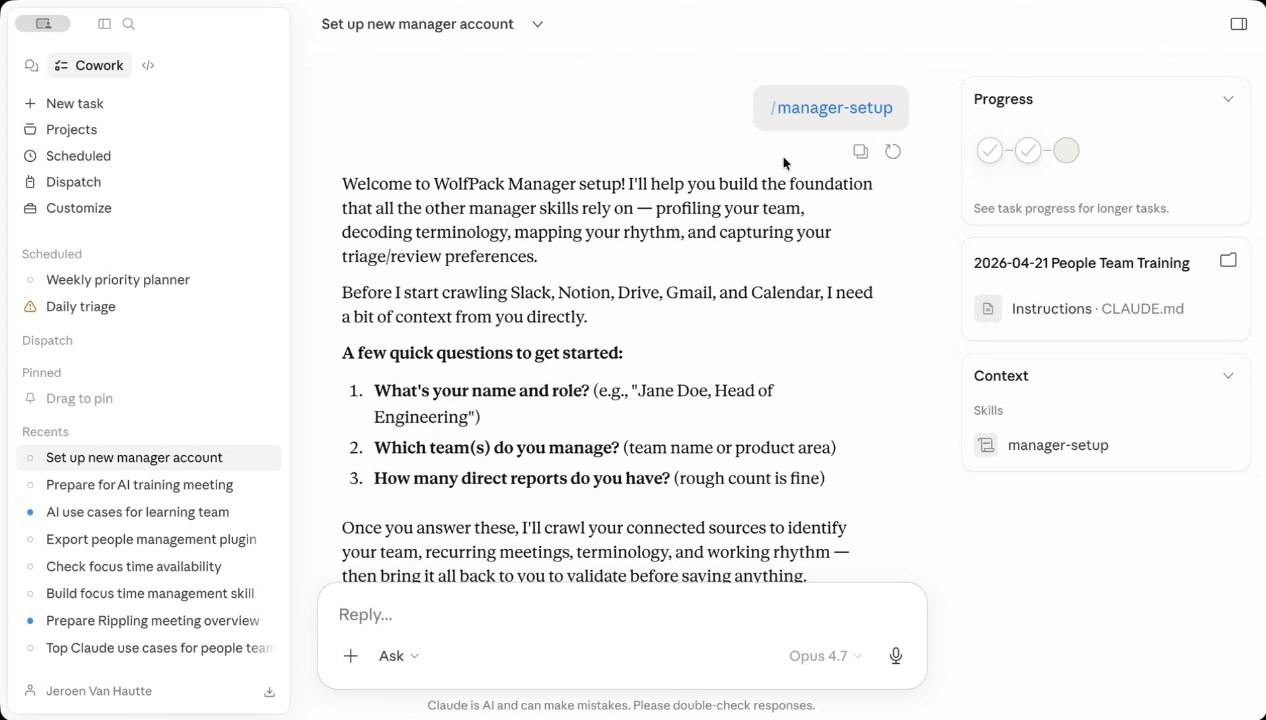
The profile is only useful if your other skills can actually find it when they run. Two things make that work:
- Reference the profile from inside your skills. When you write or update a skill, tell it to read the profile first. One line at the top of the skill body: “Before you start, read the profile in
/path/to/profile-folderfor context on me and my team.” That way every meeting-prep run, every triage, every planner starts with the profile already loaded. - Make sure the folder is mounted when the skill runs. Cowork can only read folders the task has access to. Set the profile folder as a default folder for your Cowork projects, or explicitly add it to any scheduled task that calls a skill that depends on it. Without this, the skill cannot reach the profile, and you are back to Cowork guessing.
Done right, this is “agents are only as good as the context they have” made literal. Twenty minutes once buys you a substrate every other skill in your stack rests on.
Pattern 3: Focused folders, not context dumps
Point Cowork at the smallest folder that contains the work, not the largest. If the task is about one project, the folder should be that one project. If it is about one customer, that one customer. The lens makes the answer better.
The temptation is the opposite: connect every source, drop every doc into one big folder, give Cowork “all the context.” This usually makes the output worse, not better. Cowork has to choose what is relevant; the more noise in the folder, the more wrong choices it makes. A focused folder makes the relevant signal obvious.
Two practical moves:
- Use Cowork projects to bundle the right folders for a task. A “weekly planner” project knows where your goals live and where last week’s plan landed. A “customer X” project knows the project channel, the email thread, and the Notion page. Switch projects to switch context.
- Drop the artifact in the folder, not in the chat. When Cowork produces a brief, save it to the project folder. Next week’s run can read it back and know what last week’s brief said. That is how the agent gets continuity across runs.
Smaller scope, sharper output. The same lesson as keeping skills modular instead of building one giant do-everything skill.
Pattern 4: Improve as you use
Every Cowork session is also an opportunity to update the skill. Take it.
The single sentence that turns a one-off run into a permanent improvement: “Update this skill so the next time you run it, you also include [thing it missed].” Cowork rewrites the skill body, you read the diff, you save. The next run starts at the new bar.
Putting them together
The four patterns reinforce each other. Capturing skills from real work gives you something to improve. The bootstrap profile gives every skill a smart starting point. Focused folders make every skill sharper. Improve-as-you-use is what compounds the whole stack week over week.
You do not need to adopt all four at once. A natural order: do real work in conversation and capture the first skill from it, build the bootstrap profile, narrow the folder, then make editing a habit.
Reflect
- Of the four patterns, which one would your week-from-now self thank you for adopting first? Pick that one and start tomorrow.
- What is the longest-running skill you have, and when did you last edit it? If the answer is “more than a month,” that is the one to spend ten minutes on this week.
View as plain markdown for LLMs and copy-paste